
Desplegament amb vagrant
El nostre codi del vagrantfile
# -*- mode: ruby -*-
# vi: set ft=ruby :

Vagrant.configure("2") do |config|

  config.vm.define "debian" do |demo|
    demo.vm.box = "debian"
    demo.vm.network "public_network", :bridge => "eth0", :adapter => 2
    demo.vm.provider "virtualbox" do |vb|
      vb.gui = false
      vb.memory = "512"
    end
  end
end

Vagrant.configure("2") do |config|

  config.vm.define "ubuntu" do |demo|
    demo.vm.box = "ubuntu"
    demo.vm.network "public_network", :bridge => "eth0", :adapter => 2
    demo.vm.provider "virtualbox" do |vb|
      vb.gui = false
      vb.memory = "512"
    end
  end
end

Vagrant.configure("2") do |config|

  config.vm.define "rocky" do |demo|
    demo.vm.box = "rocky"
    demo.vm.network "public_network", :bridge => "eth0", :adapter => 2
    demo.vm.provider "virtualbox" do |vb|
      vb.gui = false
      vb.memory = "512"
    end
  end
end

Vagrant.configure("2") do |config|

  config.vm.define "w10" do |demo|
    demo.vm.box = "w10"
    demo.vm.communicator = "winrm"
    demo.winrm.username = "vagrant"
    demo.winrm.password = "vagrant"
    demo.vm.network "public_network", :bridge => "eth0", :adapter => 2
    demo.vm.provider "virtualbox" do |vb|
      vb.gui = false
      vb.memory = "2048"
    end
  end
end

Vagrant.configure("2") do |config|

  config.vm.define "w2k19" do |demo|
    demo.vm.box = "w2k19"
    demo.vm.communicator = "winrm"
    demo.winrm.username = "vagrant"
    demo.winrm.password = "vagrant"
    demo.vm.provider "virtualbox" do |vb|
    demo.vm.network "public_network", :bridge => "eth0", :adapter => 2
      vb.gui = false
      vb.memory = "2042"
    end
  end
end
Alberto
Jo tindre a la meva màquina tindre el servidor, és a dir el w2k19, i la Debian, i faré una comprovació fent un vagrant up amb el Vagrantfile del grup.
w2k19
[09:49:12][test][agarcia@agarcia]-$ vagrant up w2k19
Bringing machine 'w2k19' up with 'virtualbox' provider...
==> w2k19: Clearing any previously set forwarded ports...
==> w2k19: Clearing any previously set network interfaces...
==> w2k19: Preparing network interfaces based on configuration...
    w2k19: Adapter 1: nat
    w2k19: Adapter 2: bridged
==> w2k19: Forwarding ports...
    w2k19: 5985 (guest) => 55985 (host) (adapter 1)
    w2k19: 5986 (guest) => 55986 (host) (adapter 1)
    w2k19: 22 (guest) => 2222 (host) (adapter 1)
==> w2k19: Running 'pre-boot' VM customizations...
==> w2k19: Booting VM...
==> w2k19: Waiting for machine to boot. This may take a few minutes...
    w2k19: WinRM address: 127.0.0.1:55985
    w2k19: WinRM username: vagrant
    w2k19: WinRM execution_time_limit: PT2H
    w2k19: WinRM transport: negotiate
==> w2k19: Machine booted and ready!
==> w2k19: Checking for guest additions in VM...
==> w2k19: Configuring and enabling network interfaces...
==> w2k19: Mounting shared folders...
    w2k19: /home/agarcia/Documents/test => /vagrant
==> w2k19: Machine already provisioned. Run `vagrant provision` or use the `--provision`
==> w2k19: flag to force provisioning. Provisioners marked to run always will still run.
Debian
[09:50:34][test][agarcia@agarcia]-$ vagrant up debian
Bringing machine 'debian' up with 'virtualbox' provider...
==> debian: Clearing any previously set forwarded ports...
==> debian: Fixed port collision for 22 => 2222. Now on port 2200.
==> debian: Clearing any previously set network interfaces...
==> debian: Preparing network interfaces based on configuration...
    debian: Adapter 1: nat
    debian: Adapter 2: bridged
==> debian: Forwarding ports...
    debian: 22 (guest) => 2200 (host) (adapter 1)
==> debian: Running 'pre-boot' VM customizations...
==> debian: Booting VM...
==> debian: Waiting for machine to boot. This may take a few minutes...
    debian: SSH address: 127.0.0.1:2200
    debian: SSH username: vagrant
    debian: SSH auth method: private key
==> debian: Machine booted and ready!
==> debian: Checking for guest additions in VM...
    debian: The guest additions on this VM do not match the installed version of
    debian: VirtualBox! In most cases this is fine, but in rare cases it can
    debian: prevent things such as shared folders from working properly. If you see
    debian: shared folder errors, please make sure the guest additions within the
    debian: virtual machine match the version of VirtualBox you have installed on
    debian: your host and reload your VM.
    debian:
    debian: Guest Additions Version: 6.0.0 r127566
    debian: VirtualBox Version: 7.2
==> debian: Configuring and enabling network interfaces...
==> debian: Mounting shared folders...
    debian: /home/agarcia/Documents/test => /vagrant
==> debian: Machine already provisioned. Run `vagrant provision` or use the `--provision`
==> debian: flag to force provisioning. Provisioners marked to run always will still run.
Adrian
El Adrian a la seva màquina tindrà les maquinés usuaris, és a dir la w10, Rocky, Ubuntu, i farem una comprovació del vagant up.
W10
[10:37:53][Box][alopez@alopez]-$ vagrant up w10
Bringing machine 'w10' up with 'virtualbox' provider...
==> w10: Clearing any previously set forwarded ports...
==> w10: Clearing any previously set network interfaces...
==> w10: Preparing network interfaces based on configuration...
    w10: Adapter 1: nat
    w10: Adapter 2: bridged
==> w10: Forwarding ports...
    w10: 5985 (guest) => 55985 (host) (adapter 1)
    w10: 5986 (guest) => 55986 (host) (adapter 1)
    w10: 22 (guest) => 2222 (host) (adapter 1)
==> w10: Running 'pre-boot' VM customizations...
==> w10: Booting VM...
==> w10: Waiting for machine to boot. This may take a few minutes...
    w10: WinRM address: 127.0.0.1:55985
    w10: WinRM username: vagrant
    w10: WinRM execution_time_limit: PT2H
    w10: WinRM transport: negotiate
==> w10: Machine booted and ready!
==> w10: Checking for guest additions in VM...
==> w10: Configuring and enabling network interfaces...
==> w10: Mounting shared folders...
    w10: /home/alopez/Documents => /vagrant
==> w10: Machine already provisioned. Run vagrant provision or use the --provision
==> w10: flag to force provisioning. Provisioners marked to run always will still run.
Rocky
[10:42:21][Box][alopez@alopez]-$ vagrant up rocky
Bringing machine 'rocky' up with 'virtualbox' provider...
==> rocky: Clearing any previously set forwarded ports...
==> rocky: Fixed port collision for 22 => 2222. Now on port 2201.
==> rocky: Clearing any previously set network interfaces...
==> rocky: Preparing network interfaces based on configuration...
    rocky: Adapter 1: nat
    rocky: Adapter 2: bridged
==> rocky: Forwarding ports...
    rocky: 22 (guest) => 2201 (host) (adapter 1)
==> rocky: Running 'pre-boot' VM customizations...
==> rocky: Booting VM...
==> rocky: Waiting for machine to boot. This may take a few minutes...
    rocky: SSH address: 127.0.0.1:2201
Ubuntu
[10:40:53][Box][alopez@alopez]-$ vagrant up ubuntu
Bringing machine 'ubuntu' up with 'virtualbox' provider...
==> ubuntu: Clearing any previously set forwarded ports...
==> ubuntu: Fixed port collision for 22 => 2222. Now on port 2200.
==> ubuntu: Clearing any previously set network interfaces...
==> ubuntu: Preparing network interfaces based on configuration...
    ubuntu: Adapter 1: nat
    ubuntu: Adapter 2: bridged
==> ubuntu: Forwarding ports...
    ubuntu: 22 (guest) => 2200 (host) (adapter 1)
==> ubuntu: Running 'pre-boot' VM customizations...
==> ubuntu: Booting VM...
==> ubuntu: Waiting for machine to boot. This may take a few minutes...
    ubuntu: SSH address: 127.0.0.1:2200
Jan
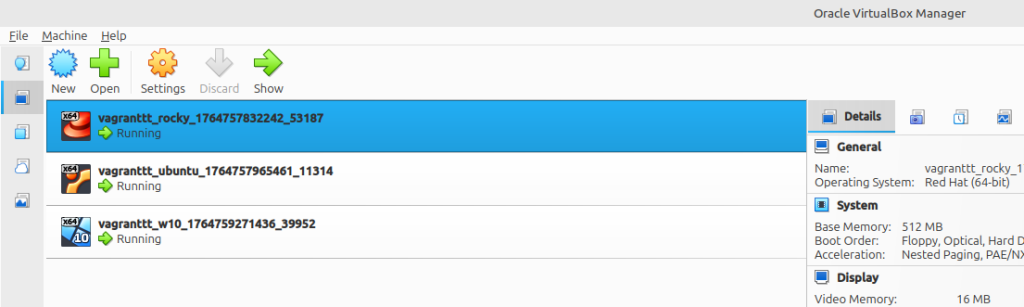
El Jan a la seva màquina tindrà les maquinés usuari test, és a dir les mateixes que l’Adrian, les w10, Rocky, Ubuntu, i farem una comprovació del vagant up.
w10
[10:37:43][box][jcanet@jcanet]-$ vagrant up w10
Bringing machine 'w10' up with 'virtualbox' provider...
==> w10: Clearing any previously set forwarded ports...
==> w10: Clearing any previously set network interfaces...
==> w10: Preparing network interfaces based on configuration...
    w10: Adapter 1: nat
    w10: Adapter 2: bridged
==> w10: Forwarding ports...
    w10: 5985 (guest) => 55985 (host) (adapter 1)
    w10: 5986 (guest) => 55986 (host) (adapter 1)
    w10: 22 (guest) => 2222 (host) (adapter 1)
==> w10: Running 'pre-boot' VM customizations...
==> w10: Booting VM...
==> w10: Waiting for machine to boot. This may take a few minutes...
    w10: WinRM address: 127.0.0.1:55985
    w10: WinRM username: vagrant
    w10: WinRM execution_time_limit: PT2H
    w10: WinRM transport: negotiate
==> w10: Machine booted and ready!
==> w10: Checking for guest additions in VM...
==> w10: Configuring and enabling network interfaces...
==> w10: Mounting shared folders...
    w10: /home/jcanet/Documents/vagranttt => /vagrant
==> w10: Machine already provisioned. Run vagrant provision or use the --provision
==> w10: flag to force provisioning. Provisioners marked to run always will still run.
Ubuntu
[10:40:15][box][jcanet@jcanet]-$ vagrant up ubuntu
Bringing machine 'ubuntu' up with 'virtualbox' provider...
==> ubuntu: Clearing any previously set forwarded ports...
==> ubuntu: Fixed port collision for 22 => 2222. Now on port 2200.
==> ubuntu: Clearing any previously set network interfaces...
==> ubuntu: Preparing network interfaces based on configuration...
    ubuntu: Adapter 1: nat
==> ubuntu: Forwarding ports...
    ubuntu: 22 (guest) => 2200 (host) (adapter 1)
==> ubuntu: Running 'pre-boot' VM customizations...
==> ubuntu: Booting VM...
==> ubuntu: Waiting for machine to boot. This may take a few minutes...
    ubuntu: SSH address: 127.0.0.1:2200
    ubuntu: SSH username: vagrant
    ubuntu: SSH auth method: private key
==> ubuntu: Machine booted and ready!
==> ubuntu: Checking for guest additions in VM...
==> ubuntu: Mounting shared folders...
    ubuntu: /home/jcanet/Documents/vagranttt => /vagrant
==> ubuntu: Machine already provisioned. Run vagrant provision or use the --provision
==> ubuntu: flag to force provisioning. Provisioners marked to run always will still run.
Rocky
[10:40:50][box][jcanet@jcanet]-$ vagrant up rocky
Bringing machine 'rocky' up with 'virtualbox' provider...
==> rocky: Clearing any previously set forwarded ports...
==> rocky: Fixed port collision for 22 => 2222. Now on port 2201.
==> rocky: Clearing any previously set network interfaces...
==> rocky: Preparing network interfaces based on configuration...
    rocky: Adapter 1: nat
==> rocky: Forwarding ports...
    rocky: 22 (guest) => 2201 (host) (adapter 1)
==> rocky: Running 'pre-boot' VM customizations...
==> rocky: Booting VM...
==> rocky: Waiting for machine to boot. This may take a few minutes...
    rocky: SSH address: 127.0.0.1:2201
    rocky: SSH username: vagrant
    rocky: SSH auth method: private key
==> rocky: Machine booted and ready!
==> rocky: Checking for guest additions in VM...
==> rocky: Mounting shared folders...
    rocky: /home/jcanet/Documents/vagranttt => /vagrant
==> rocky: Machine already provisioned. Run vagrant provision or use the --provision
==> rocky: flag to force provisioning. Provisioners marked to run always will still run.